Which Hardware Wallets Support Multiple Independent Seed Phrases in 2026?
Which hardware wallets support multiple independent seed phrases? Compare ERA Wallet, Keystone, COLDCARD, Ledger, Trezor, and Tangem.

One hardware wallet, one seed phrase? Not necessarily.
Imagine you use crypto for long-term savings, everyday transfers, and DeFi. You want to separate those funds not just into different addresses, but into wallets controlled by entirely different keys.
You do not necessarily need a separate hardware device for each one. Some hardware wallets with multiple seed phrases can hold several distinct recovery secrets on a single device.
ERA Wallet device, Keystone 3 Pro, and COLDCARD are three examples. But their limits, storage models, and wallet-switching workflows are not the same.
Here is how the available approaches compare, why independent seeds are different from extra accounts and passphrase wallets, and when the distinction matters.
What Are Multiple Independent Seed Phrases?
A seed phrase, also called a recovery phrase, is a sequence of words used to recover a wallet’s cryptographic keys. Wallets following BIP-39 commonly use 12 or 24 words.
A single seed can generate many addresses and accounts. Those accounts, however, still share the same underlying secret.
Multiple independent seed phrases mean that a device can generate or import several separate root secrets.
- Wallet A: long-term savings, seed phrase #1.
- Wallet B: everyday transactions, seed phrase #2.
- Wallet C: DeFi activity, seed phrase #3.
If the phrases were generated independently, compromising one seed does not, by itself, reveal the keys derived from the others. Each wallet can also be restored separately from its own backup.
Market Overview: Different Approaches to Multiple Wallets
Hardware wallets handle multiple sets of keys in different ways. Some store separate root seeds; others provide multiple accounts or additional wallets derived with a BIP-39 passphrase.
All three approaches can produce different addresses and balances, but they are not technically interchangeable.
| Hardware wallet | Independent seed phrases on one device | Wallet selection / management |
|---|---|---|
| ERA Wallet device | Yes - up to 10 | Automatic wallet identification with Quick Sign |
| Keystone 3 Pro | Yes - up to 3 | Switch using the password for the relevant wallet |
| COLDCARD | Yes - via Temporary Seeds and Seed Vault | Select a saved secret manually |
| Ledger | Not stored simultaneously in standard operation | Multiple accounts and passphrase wallets |
| Trezor | Not stored simultaneously in standard operation | Multiple accounts and passphrase wallets |
| Tangem | Not on one card set | Up to 20 accounts derived from a shared root secret |
Swipe the table sideways to see all columns
Specifications last checked: November 11, 2026. Features may vary by model and firmware.
ERA Wallet: Up to 10 Independent Seed Phrases
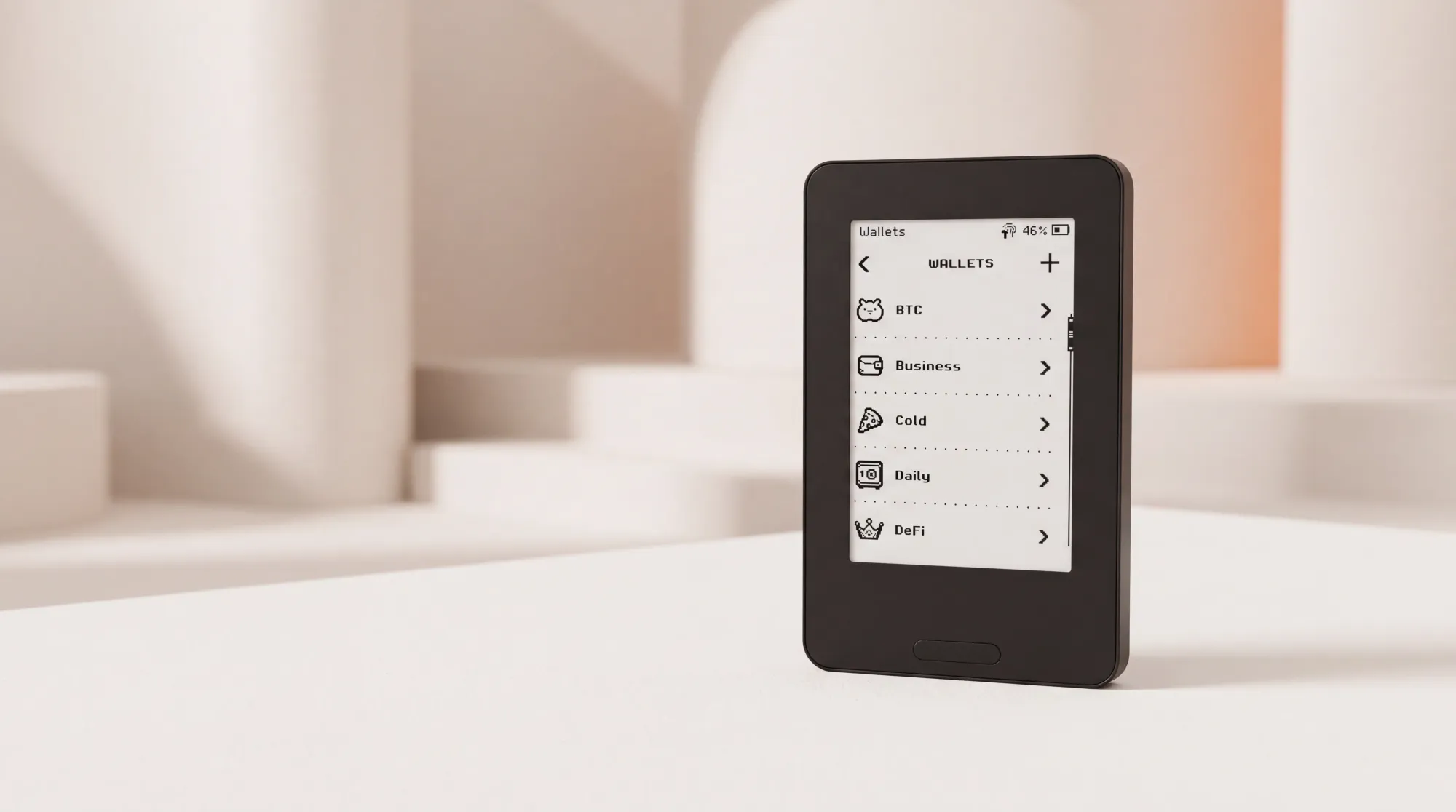
ERA Wallet device can create or import up to ten separate wallets, each with its own seed phrase, on one physical device.
Every wallet can have its own name, recovery backup, and optional access protection. This makes it possible to manage distinct sets of keys without changing hardware every time you switch between tasks.
Quick Sign: Less Switching Between Active Wallets
The more wallets you use, the more important the signing workflow becomes.
Suppose you transact from three different wallets throughout the day. Ordinarily, you might need to find and open the right wallet before every signature.
Quick Sign simplifies that flow. Instead of requiring you to select a wallet first, ERA Wallet device identifies a matching wallet from the information in the signing request.
A typical QR-signing flow looks like this:
- Create a transaction in a compatible software wallet.
- From the ERA Wallet device home screen, tap SCAN QR and scan the signing request.
- Quick Sign identifies the matching wallet among those it can access automatically.
- The device opens its transaction-review screen and displays the selected wallet’s name.
- Review the details on the device and approve the signature.
For frequently used wallets, there is no need to open the right seed manually before scanning. See the Quick Sign workflow for the precise signing behavior.
NFC Signing: Tap Sign
Alongside QR signing, Tap Sign is a planned NFC signing option for ERA Wallet device and ERA Wallet app. It will let a user send a transaction to an unlocked device by tapping the phone against it, rather than scanning a QR code.
From the home screen or wallet list, the device can use Quick Sign to determine which wallet matches the request. The user still reviews and approves the transaction on the device, then taps the phone a second time to collect the signature.
Availability note: The official Tap Sign guide states that Tap Sign is not yet visible in the current ERA Wallet app version. Until the relevant app release, QR signing remains the available workflow. Tap Sign is designed for ERA Wallet app; other software wallets continue to use QR codes.
ERA Wallet device also separates two access controls:
- Device PIN or password: the required protection that unlocks the physical device.
- Individual wallet PIN or password: optional protection set independently for a particular wallet.
For example, frequently used wallets can remain without an additional wallet-level password and work with Quick Sign, while a long-term savings wallet can have its own PIN or password.
Quick Sign does not bypass a protected wallet. If the request belongs to one, the user must select and unlock it; a BIP-39 passphrase may also need to be entered. This is documented in the wallet password guide.
The result is a flexible balance between fast access to active wallets and extra protection for those used less often.
Keystone 3 Pro: Up to Three Seed Phrases
Keystone 3 Pro can generate or import up to three sets of seed phrases on one device. Each set functions as a separate wallet with its own access password.
When adding a wallet, the user creates its password, chooses whether to generate or import a seed, and saves the relevant backup. To use a different wallet, the user switches to it with the corresponding password.
This workflow is documented in Keystone’s guide to managing three seed phrases.
COLDCARD: Temporary Seeds and Seed Vault
COLDCARD offers a different way to manage multiple cryptographic secrets. Its Temporary Seeds feature lets users activate another secret without replacing the device’s main seed.
That temporary secret can be imported, generated separately, or derived using a standard such as BIP-85. In the usual temporary mode, it remains in RAM rather than being permanently installed as the main secret in a Secure Element.
Seed Vault adds the option to retain several temporary secrets in encrypted settings and later activate one using `Use This Seed`.
Its architecture differs from a set of independent permanent seed slots: Seed Vault records are encrypted with key material tied to the device’s main seed, and some stored secrets may themselves be derived from another secret.
These mechanics, including the supported secret sources, are covered in COLDCARD’s Temporary Seeds documentation.
Ledger, Trezor, and Tangem: Other Ways to Manage Multiple Wallets
These popular hardware wallets also support multiple crypto accounts, but the distinction lies in how the keys are derived and restored.
Ledger lets users create multiple accounts from a recovery phrase, as well as additional wallets using a BIP-39 passphrase. In standard operation, this is different from keeping several independently generated recovery phrases available simultaneously.
Trezor supports multiple accounts and passphrase wallets. Each passphrase produces a different wallet with its own addresses, but recovery requires both the original wallet backup and the exact passphrase.
Tangem supports up to 20 accounts within one wallet. The accounts have separate addresses, balances, and histories, but share the same root secret and backup system. Tangem app can also manage separate hardware wallets backed by different sets of cards.
In short, multiple accounts in an app do not automatically mean that one hardware device stores multiple independent seed phrases.
Multiple Seed Phrases vs. Passphrase Wallets
Multiple accounts, passphrase wallets, and independent seeds may look similar on screen: separate addresses, balances, and transaction histories. Under the hood, they work differently.
What Is Key Derivation?
Most modern wallets use hierarchical deterministic (HD) key derivation. The name sounds technical, but the idea is straightforward: one root secret can generate many private keys and addresses.
Think of it as a tree:
- Seed phrase: the root.
- Accounts: the branches.
- Addresses: the smaller branches growing from them.
Each branch can have different assets and balances, but the branches still come from the same root. Twenty accounts, therefore, do not necessarily mean twenty independent seed phrases.
How Do Passphrase Wallets Work?
Under BIP-39, a user can add a secret text string called a passphrase. The same mnemonic phrase paired with different passphrases produces different cryptographic wallets:
- Seed phrase + passphrase A = Wallet A
- Seed phrase + passphrase B = Wallet B
- Seed phrase + passphrase C = Wallet C
Each wallet has different keys, addresses, and balances. But restoring any one of them requires both the original mnemonic and the exact passphrase.
With genuinely independent seed phrases, each wallet has its own root secret and can be restored without needing another wallet’s recovery phrase.
| Property | Multiple accounts | Passphrase wallets | Independent seed phrases |
|---|---|---|---|
| Root seed | One | One shared root | One per wallet |
| Different addresses and balances | Yes | Yes | Yes |
| Extra BIP-39 passphrase | Not required | Required | Not required |
| Restore from a standalone seed phrase | No | No | Yes |
| Depends on the same original seed | Yes | Yes | No |
Swipe the table sideways to see all columns
There is one further distinction: BIP-85 can derive new seed phrases from a master secret. Those phrases can be used in separate wallets, but they are not independent of that master secret. Anyone with the master secret and the relevant derivation details can reproduce them.
That is why a comparison of multiple independent seeds should distinguish freshly generated or independently imported root secrets from derived ones.
Who Needs Multiple Seed Phrases on One Hardware Wallet?
Multiple seed phrases are useful when you want to separate keys by purpose without carrying a different physical signer for every activity.
Long-term savings and everyday payments. Keep your long-term holdings under one seed and regular spending under another.
Personal and business funds. Separate personal assets from the crypto used for invoices, business expenses, or other work.
DeFi and Web3. Keep a dedicated wallet for smart-contract interactions instead of using the same keys as your long-term savings. You still need to inspect every transaction you sign.
Existing wallets. Import independently created seed phrases into a compatible device rather than switching between several physical signers.
Shared workflows and Bitcoin multisig. Consider a 2-of-3 Bitcoin multisig arrangement in which two of three signatures are required. A team in one office could, in principle, use separate seed-backed wallets and individual wallet passwords on a shared ERA Wallet device, enrolling each as a distinct cosigner in a compatible coordinator. Each participant would select and unlock their own wallet to sign their part of a PSBT.
ERA’s Bitcoin multisig guide documents cosigner key export, descriptor import, and PSBT signing with coordinators such as Sparrow and Nunchuk. The guide describes the cosigner workflow; it does not present a shared-device, multi-employee configuration as a substitute for independent signer hardware.
Distinct keys are not the same as distinct devices. Sharing one signer introduces a common physical and firmware risk, even when each cosigner uses a different seed phrase and wallet password. For security-critical multisig setups, physically separate devices and custody arrangements remain the stronger model.
Each independent wallet also needs its own reliable recovery backup. For practical backup hygiene, see how recovery phrases can be exposed through photos.
How to Choose a Hardware Wallet with Multiple Seed Phrases
Start by deciding whether you actually need cryptographically separate root secrets or simply different accounts with separate balances.
If key independence matters, check whether the device can create or import several separate seed phrases. Then look at the daily workflow: how do you switch wallets, how does the device pick a signing key, and what access controls can you configure?
Finally, make sure you understand how to back up and recover each wallet on its own.
The best option is the one whose mechanisms you understand and can use simply and safely.
One device. Up to 10 independent seed phrases. Keep your wallets separate without carrying extra hardware. Code ERABLOG20 for 20% off.
Frequently Asked Questions
Can a hardware wallet store multiple seed phrases?
Yes. Some hardware devices support several root secrets at once. ERA Wallet device supports up to ten separate seed-backed wallets, Keystone 3 Pro supports up to three, and COLDCARD can work with multiple additional secrets through Temporary Seeds and Seed Vault.
Which hardware wallet supports the most independent seed phrases?
Among the devices in this comparison with a documented fixed number of wallets, ERA Wallet device supports up to ten and Keystone 3 Pro up to three. COLDCARD uses a different storage model with Seed Vault, so a direct slot-count comparison would be misleading. This is not an exhaustive ranking of every hardware wallet on the market.
Can I use multiple crypto wallets on one hardware device?
Yes. Depending on the product, you can use multiple accounts, passphrase wallets, or wallets with different seed phrases. The key question is whether those wallets share a root secret and what information you need to recover them.
What is the difference between multiple seed phrases and passphrases?
A passphrase wallet is derived from the combination of a shared mnemonic and an additional secret string. Independently generated seed phrases create separate roots, allowing each associated wallet to be recovered without the recovery material for the others.