What Is a Crypto Private Key? And Who Really Has Access to Yours?
One click creates a crypto wallet, but what happens behind the scenes? Learn how private keys, seed phrases, and public keys work, where your keys live, and why that matters for security.


Modern crypto wallets are designed to make things simple. Click "Create Wallet," wait a few seconds, and you're ready to receive, store, and send crypto.
But behind that single button is a process most users never see. Random data is generated, cryptographic keys are created, and wallet addresses are derived.
A good interface means you don't need to understand cryptography to use crypto. But when you're responsible for protecting your own assets, knowing the basics matters.
After all, it's difficult to protect something if you don't know where it lives, how it works, or who might be able to access it.
So let's look at how private keys are created, what public keys and seed phrases actually do, and why the way your keys are stored can matter more than the number of security features in your wallet app.
What Actually Happens When You Create a Crypto Wallet?
Behind the familiar "Create Wallet" button, most modern wallets follow a process that looks something like this:
Random Data → Seed Phrase → Private Keys → Public Keys → Wallet Addresses
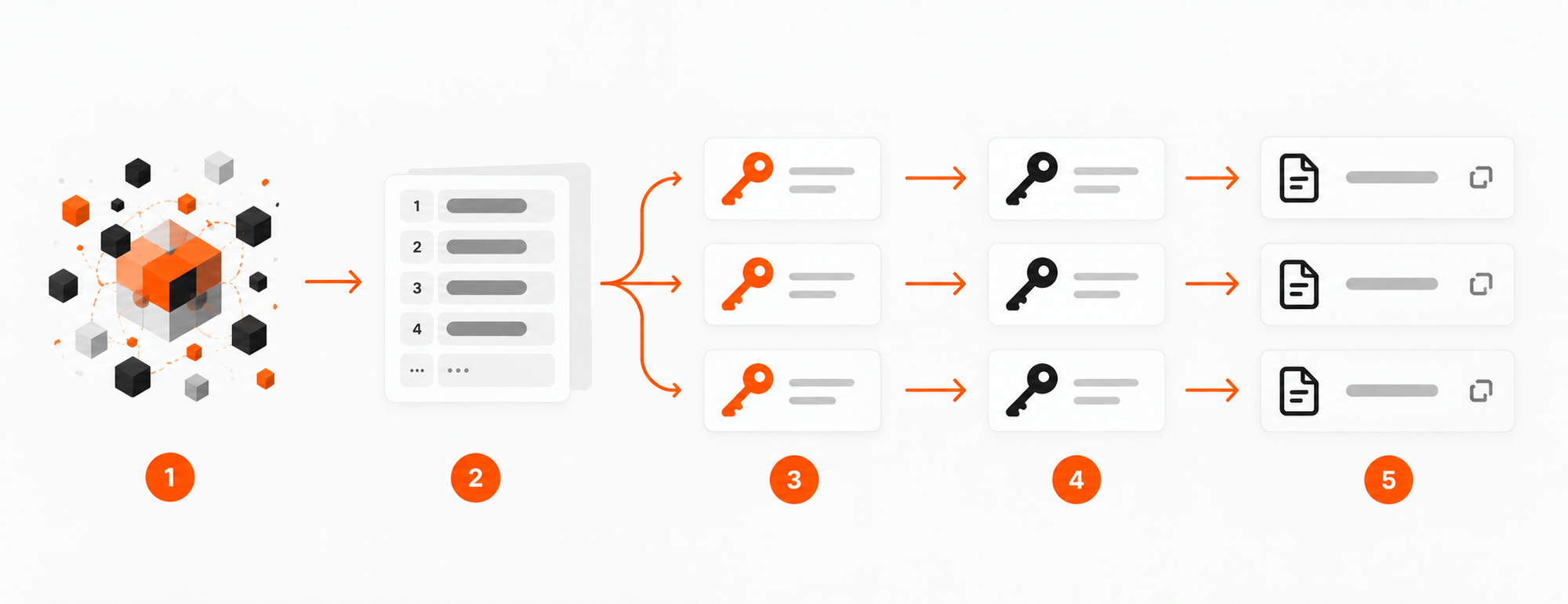
Each step serves a different purpose. And the security of your wallet starts long before your first address appears.
1. Entropy: Where Does the Randomness Come From?
Everything starts with randomness.
In cryptography, the unpredictability of data is measured in terms of entropy.
Imagine your wallet needs to create a secret number that nobody else in the world can guess. If that number comes from something predictable, like the current time or a simple numerical sequence, an attacker might be able to reproduce it.
That's why crypto wallets rely on cryptographically secure random number generators.
How do software wallets generate randomness?
Most mobile and browser wallets request secure random data from the operating system.
The operating system gathers unpredictable information from available sources and uses it to maintain a cryptographically secure random number generator.
You don't need to move your mouse, roll dice, or invent random numbers yourself. The process happens automatically.
When implemented correctly, this approach can provide strong cryptographic security. However, the wallet relies on the operating system and its randomness mechanisms working as intended.
What about hardware wallets?
Hardware wallets can generate randomness using dedicated hardware components called true random number generators, or TRNGs.
These components derive unpredictable data from physical processes inside electronic circuits, such as electrical noise.
The implementation varies between manufacturers. Some wallets use a generator built into the main microcontroller, others use a secure element, and some combine multiple sources.
ERA Wallet uses two independent hardware random number generators: one inside its STM32 microcontroller and another inside its ATECC608C secure element.
In Expert Mode, users can contribute three additional sources: finger movements on the touchscreen, device motion, and camera data.
ERA tests the collected user-generated data before using it and combines the sources through a cryptographic mixing function.
This gives ERA up to five sources of entropy. The purpose is to reduce reliance on any single source of randomness, rather than assuming one chip or generator can never fail.
For a deeper explanation of the design, testing process, and how the sources are combined, read Randomness You Don't Have to Trust: How ERA Generates Your Seed Phrase.
2. Seed Phrase: How Does Random Data Become Words?
Once a wallet has generated secure random data, it needs a way to turn that data into something you can back up.
A long sequence of binary digits isn't exactly convenient to write down or recover later.
That's where the seed phrase, also called a recovery phrase, comes in.
Under the widely used BIP-39 standard, the wallet takes random data, adds a small checksum, and converts the result into words from a predefined list.
For example:
- 128 bits of entropy produce a 12-word recovery phrase.
- 256 bits of entropy produce a 24-word recovery phrase.
The words aren't chosen because they make sense together. They are a human-readable representation of the underlying data.
Why does the seed phrase matter?
In a typical hierarchical deterministic (HD) wallet, the recovery phrase is used to generate a cryptographic seed, from which the wallet derives multiple private keys.
An optional BIP-39 passphrase can also affect the resulting keys.
This means one recovery phrase can back up many accounts across supported networks.
If your phone breaks or your hardware wallet is lost, a compatible wallet can use the same recovery phrase and derivation settings to reconstruct your keys.
But the same recovery mechanism works for anyone who obtains that phrase.
That's why your seed phrase should never be photographed, uploaded to cloud notes, shared with support staff, or entered into an unfamiliar website.
3. Private Key: The Secret That Authorizes Transactions
Now the wallet has the information it needs to derive private keys.
A private key is a secret cryptographic number used to create digital signatures.
Let's say you want to send 0.1 ETH to a friend. You open your wallet, enter the recipient's address, and choose the amount. The app prepares the transaction. Next comes signing.
Your wallet uses the relevant private key to produce a digital signature that authorizes the transaction. The signed transaction can then be broadcast to the Ethereum network.
The network verifies that the signature is valid for the account involved. Your private key itself does not need to be sent to the blockchain.
Here's the important distinction:
- A seed phrase can typically restore an entire collection of private keys.
- An individual private key authorizes transactions for its corresponding account.
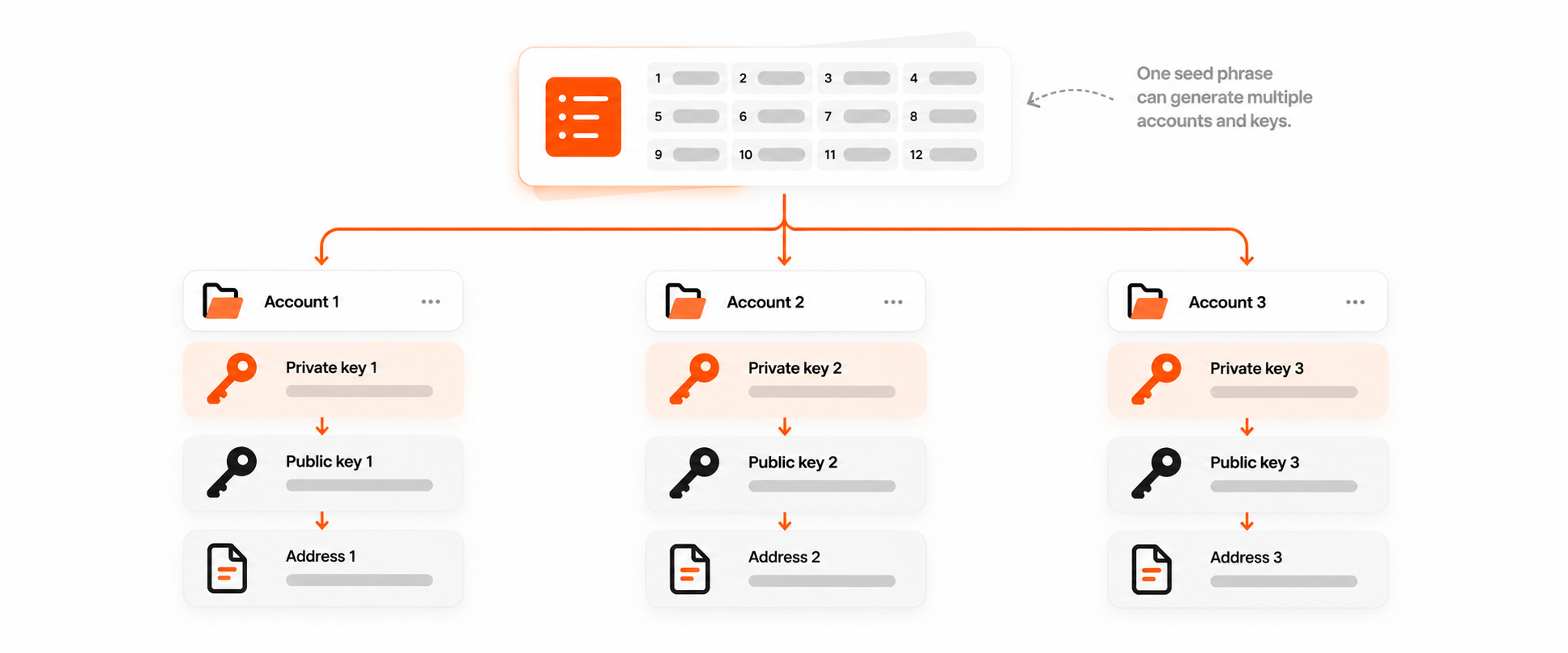
If someone steals one private key, they don't automatically gain the ability to reconstruct every other private key derived from the same recovery phrase.
But if someone obtains the recovery phrase, multiple associated accounts may be exposed.
And once a private key is compromised, an attacker can potentially sign transactions without your password, phone, or approval.
4. Public Key: How Does the Network Verify Your Signature?
Every standard private key has a mathematically related public key.
The private key creates digital signatures. The public key allows those signatures to be verified.
Think of it like a special seal. You use the secret seal to mark a document, while other people can check that the mark is authentic without possessing the seal themselves.
Cryptographic signatures work on a similar principle.
The network can verify that a transaction was authorized by the corresponding private key without learning the private key itself.
5. Wallet Address: What You Actually Share With Others
A wallet address is an identifier used to receive crypto and interact with a blockchain.
Ethereum addresses typically begin with 0x, while Bitcoin addresses have different formats depending on their type.
In common wallet designs, addresses are derived from public keys using cryptographic transformations. The exact process depends on the blockchain.
So these three things are not interchangeable:
- Private key: Creates digital signatures.
- Public key: Helps verify those signatures.
- Wallet address: Identifies where assets can be received or which account is involved.
Now the process behind "Create Wallet" makes more sense.
Your wallet generated randomness, created a recovery phrase, derived cryptographic keys, and produced addresses you can use.
But there's still one critical question:
Where are those private keys stored, and what software can access them?
Where Are Private Keys Stored, and Why Does It Matter?
A private key can be practically impossible to guess and still be stolen.
Strong cryptography protects against someone calculating your secret. It doesn't automatically protect against malware copying that secret from a compromised device.
That's why the storage and signing environment matters.
Software Wallets: Convenient, but Dependent on Their Environment
Many mobile and browser wallets store encrypted private key material on your phone or computer.
When you unlock the wallet, the application can access the information it needs to sign transactions. This makes software wallets convenient for everyday use, dApps, and frequent transactions. But it also creates a dependency on the security of the device and application.
If the operating system, browser extension, or wallet software is compromised, an attacker may be able to access sensitive key material.
Not all software wallets have the same security model. Some use hardware-backed storage, operating-system protections, or additional isolation mechanisms.
Still, encrypting a private key while it's stored does not guarantee protection if malicious code can access it when the wallet is unlocked.
Hardware Wallets: Keeping Private Keys Separate
Hardware wallets take a different approach.
Instead of relying on a general-purpose phone or computer to store and use private keys, they keep signing operations inside a separate physical device.
The companion application can prepare a transaction, but the hardware wallet performs the signature. In a properly implemented design, the private key stays inside the hardware device. That means compromising the phone or browser application does not automatically expose the private key.
ERA Wallet follows this separation. Its mobile application prepares transactions, while the hardware device handles verification and signing.
ERA also supports air-gapped signing via QR codes, allowing transaction data to move between the phone and hardware wallet without a direct wired or wireless connection between them.
ERA Lens adds another layer by decoding supported transaction data offline and displaying the details on the hardware wallet screen before approval.
These mechanisms address two different risks:
- Key isolation helps protect private keys from compromise through everyday software.
- Transaction verification helps users identify unexpected recipients, amounts, or permissions before signing, when those details are supported and displayed.
Neither makes every transaction automatically safe. A user can still approve a harmful operation, especially if its implications are misunderstood or cannot be fully interpreted.
What About Keeping a Seed Phrase on Paper?
Writing your seed phrase on paper or engraving it on metal is a backup method.
It can protect the backup from remote access while it remains offline, but it introduces physical risks such as theft, damage, and loss.
And there's another important distinction.
Where your recovery phrase is backed up is not necessarily where your private keys are used.
If you keep a seed phrase on paper but have already imported it into a compromised software wallet, the offline backup does not undo the exposure.
A secure backup and a secure signing environment solve different problems.
What Happens When a Private Key Is Stolen? The Fearless Wallet Incident
On October 21, 2026, the Polkadot Community Foundation published a security notice concerning the Fearless Wallet browser extension.
According to the investigation, malicious code had been introduced into the extension's public source code on February 19, 2025.
When affected users unlocked their wallets, the code could transmit their private keys to an attacker-controlled server.
The notice identified versions 3.0.1, 3.0.3, 3.0.4, and 3.0.5. The malicious functionality was active during different periods between February 2025 and October 10, 2026.
At the time of the warning, eight users had reported unauthorized transactions potentially linked to the incident, totaling 17,286 DOT. That figure represented reported cases, not necessarily the full extent of the exposure.
Fearless Wallet is a third-party application, not an official Polkadot wallet.
What makes this incident particularly important is how little a user needed to do wrong. They didn't necessarily have to enter their recovery phrase on a phishing website or approve a suspicious transaction. The malicious functionality was inside the wallet extension itself.
Once an attacker obtained a private key, they could potentially sign transactions independently, without knowing the user's wallet password.
Changing your password doesn't change your private key. Reinstalling the app doesn't either.
That's why the Polkadot Community Foundation advised affected users to generate fresh keys outside Fearless Wallet and move their funds to new accounts.
The incident doesn't prove that all software wallets are unsafe. It demonstrates a specific architectural risk: when an application can access secret key material, a compromise of that application may become a compromise of the keys themselves.
How to Protect Your Crypto Private Keys
You don't need to become a cryptographer to improve your wallet security. A few principles make a meaningful difference.
1. Never share your private key or recovery phrase.
Legitimate support teams don't need them. Neither do websites claiming they can verify, synchronize, or repair your wallet.
2. Keep backups away from everyday online exposure.
Avoid screenshots, unencrypted cloud notes, and documents containing your recovery phrase. Protect physical backups against theft, loss, and damage.
3. Choose a storage model that matches your risk.
A software wallet can be practical for small, frequent transactions. For substantial or long-term holdings, consider a hardware wallet that keeps private keys separate from your everyday device.
4. Verify transactions before signing.
Private key isolation doesn't prevent every malicious transaction. Check recipients, amounts, and permissions on a trusted display whenever possible, particularly when interacting with DeFi applications.
5. Replace compromised keys, not just passwords.
If your private key or recovery phrase has been exposed, create a new wallet with fresh keys in a trusted environment and move any remaining funds.
Importing a compromised recovery phrase into a hardware wallet does not make it secure again.
What Are You Really Protecting?
The "Create Wallet" button hides a surprisingly complex process. That's good design. Crypto shouldn't require a cryptography degree.
But a simple interface doesn't eliminate the need to understand the basics.
Your recovery phrase can restore your keys. Your private keys authorize transactions. Public keys help verify signatures. And the way those secrets are stored determines which parts of your system must remain trustworthy.
The Fearless Wallet incident is a reminder that even familiar software can become a security risk when it has access to private keys.
So when choosing a crypto wallet, there's one question worth asking beyond convenience, features, or supported networks:
What happens to my private keys if the app I use gets compromised?
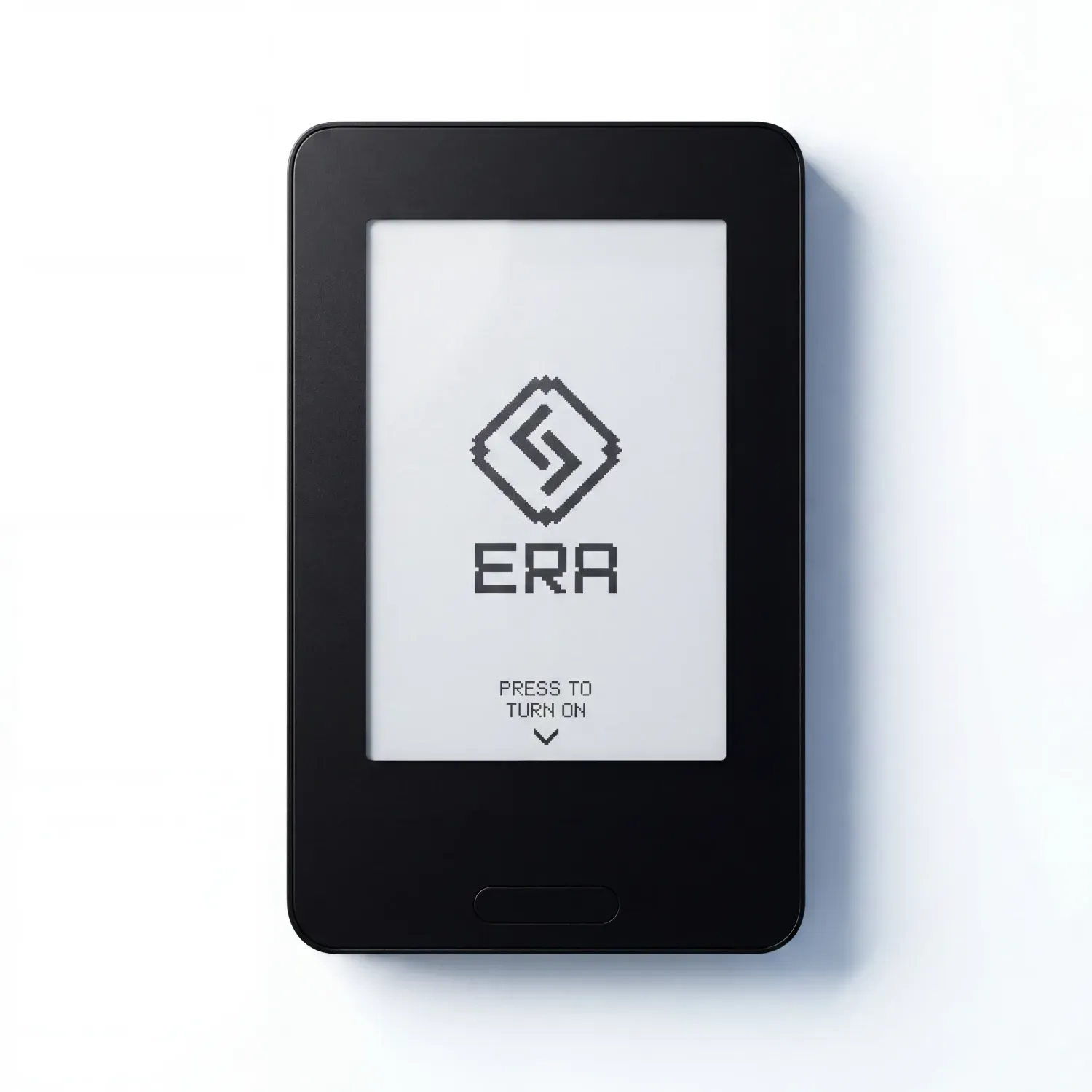
Keep your keys separate from your phone. Verify transactions on a dedicated device. Stay in control with ERA Wallet.
Code ERABLOG20 for 20% off.